
Verissimo Linter for SystemVerilog and UVM
Powerful lint tool for a thorough audit of your design and verification code.
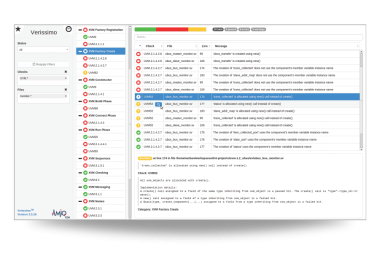
What Is Verissimo SystemVerilog Linter
Verissimo is a high-performance SystemVerilog linter and coding guideline and verification methodology compliance solution designed for in-depth analysis of your design and verification code.
Improves design and verification code quality and reliability.
Prevents incorrect functionality and performance issues.
Automates coding guidelines checks, including UVM compliance.
Simplifies code maintenance.
Identifies dead code and copy-paste code.
Accelerates language and methodology learning.
Ensures best coding practices are followed.
Speeds up bugfixing.
Why SystemVerilog Linting Is Essential
SystemVerilog provides powerful constructs and a high level of programming flexibility. Its capabilities meet today's complex design and verification requirements, but at the same time introduce new challenges in code development. For example, the ability to implement the same functionality in multiple ways may impact the simulation performance or lead to unexpected behavior.
A SystemVerilog compiler checks whether your source code follows the IEEE 1800 standard rules and flags only language-specific syntactic and semantic errors. However, the absence of compilation errors gives no insight into code reliability and maintainability. Nor does it imply that best coding practices have been implemented or that compliance with the recommended methodologies like the Universal Verification Methodology (UVM) has been met.
Verissimo is a SystemVerilog and UVM lint tool that fills this gap by enabling engineers to enforce specific group or corporate coding guidelines to ensure consistency and best practices in code development.
Key Features
Comprehensive SystemVerilog Static Analysis and Lint Checks
- Comprehensive library of both generic SystemVerilog and UVM built-in checks.
- Checks for suspicious language usage such as non-standard syntax, problematic delta cycle usage, and prohibited system calls.
- Checks for semantic issues that are not caught by a SystemVerilog compiler, for example, an overridden non-virtual method, which will likely result in unexpected behavior.
- Checks for performance issues like passing arrays by reference to avoid useless copies.
- Checks for dead code, that is for unused code elements such as variables that are never read or written, or functions that are never called.
- Checks for copy-paste code duplication.
Robust Coding Standards and Methodology Enforcement
- Checks for improper styling such as confusing declaration order and naming conventions.
- Checks for verification methodology violations such as inappropriate object creation, missing calls, or constructs that should be avoided.
Flexible Rule Customization and Configuration
- Customizable check parameters.
- API for creating new custom checks.
- Ability to create and execute custom rule sets by selecting from available built-in checks.
- Ability to specify per check severity.
Actionable Reporting and Results Management
- Waivers for filtering exceptions and irrelevant failures.
- HTML report with advanced searching and filtering capabilities, bookmarking and monitoring features, and a dashboard that summarizes linting results.
Seamless Workflow and IDE Integration
- Support for batch or GUI mode execution.
- Integration with the DVT IDE (GUI mode, in Eclipse or VS Code).
- Ability to automatically correct violations.
Why choose Verissimo SystemVerilog Linter
- Improve your design and verification code quality and reliability.
- Prevent incorrect functionality and performance issues.
- Enforce best coding practices.
- Reduce source code maintenance costs.
- Ensure consistency in code development at the team or company level.
- Create, customize, and implement group or corporate-specific rules.
Frequently Asked Questions
What is a SystemVerilog linter?
A SystemVerilog linter is a static analysis tool that checks RTL and verification code for issues not detected by the compiler, such as coding style violations, semantic mistakes, performance problems, and methodology violations.
What is a Verilog lint tool?
A Verilog linter analyzes Verilog source code to detect potential design and coding issues early in development. It reviews the code against a set of predefined rules and best practices to identify problems such as multiple drivers, multiple clock signals, width mismatching, or unused signals.
What types of issues does Verissimo detect?
Verissimo detects a wide range of issues, including language misuse, semantic errors, coding style violations, performance problems, dead code, code duplication, and verification methodology violations.
How is Verissimo different from a SystemVerilog compiler?
A SystemVerilog compiler verifies that source code follows the IEEE 1800 language rules and reports syntactic or semantic errors that prevent successful compilation. Verissimo goes further by performing static code analysis (linting) to detect issues that compilers do not flag, such as coding guideline violations, potential performance problems, dead code, and verification methodology issues.
Does Verissimo support Verilog?
Yes. Verissimo supports both SystemVerilog and Verilog code analysis.
Is Verissimo only for UVM projects?
No. Verissimo can be used for both design and verification code, not only UVM-based projects. It analyzes SystemVerilog and Verilog source code and includes both generic language checks and UVM-specific checks.
Does Verissimo check UVM compliance?
Yes. Verissimo includes built-in checks for UVM-based verification environments and can detect violations of recommended verification methodologies.
Does Verissimo detect dead code and duplicate code?
Yes. Verissimo includes checks that detect dead code, such as variables that are never read or written or functions that are never called, as well as copy-paste code duplication.
Can Verissimo enforce custom coding rules?
Yes. Verissimo allows teams to define and enforce custom coding rules. You can configure rule sets, customize rule attributes (such as severity), and create new checks using the provided API to match internal coding guidelines and project requirements.
Does Verissimo support batch execution?
Yes. Verissimo supports batch mode execution, allowing lint checks to run from the command line.
Can Verissimo automatically fix violations?
Yes. Verissimo includes the ability to automatically correct certain types of violations.
Can Verissimo be integrated with IDEs?
Yes. Verissimo integrates with the DVT IDE, allowing engineers to run lint checks and review violations directly within the development environment. The integration supports GUI mode in Eclipse and Visual Studio Code, helping teams analyze and fix issues as they write code.
Can Verissimo be used with other hardware design and verification tools?
Yes. Verissimo can be used alongside other tools commonly used in SystemVerilog development and verification.
For example, teams may use:
- DVT IDE for editing, navigating, and analyzing SystemVerilog code
- DVT Debugger to debug simulation behavior and investigate verification issues
- Specador Documentation Generator to generate documentation from HDL/HVL source code
- DVT MCP Server to enable integrations with modern development tools and automation systems