Problem Matchers
Problem matchers scan the task output for known info, warning or error strings, and report these inline in the editor and in the Problems Panel. You can find here more details about the syntax for manually define problem matchers.
Built-in Task Snippets & Problem Matchers
DVT provides built-in problem matchers or task snippets that allows you to easily extract problems from the simulator logs. These can be added to the tasks.json using Content Assist (Autocomplete). For a comprehensive reference, see this demo movie.
{
    "version": "2.0.0",
    "tasks": [
        {
            "label": "Questa Compile",
            "type": "shell",
            "command": "./questa_compile.sh | ${DVT_SIMLOG_PROCESSOR}",
            "problemMatcher": [
                "$dvt-questa-error-1",
                "$dvt-questa-error-2",
                "$dvt-questa-fatal-1",
                "$dvt-questa-fatal-2",
                "$dvt-questa-open-file-error",
                "$dvt-questa-open-file-fatal",
                "$dvt-questa-warning-1",
                "$dvt-questa-warning-2",
                "$dvt-uvm-error",
                "$dvt-uvm-fatal",
                "$dvt-uvm-info",
                "$dvt-uvm-warning"
            ]
        }
    ]
}
Task Snippets
dvt-task-vcs-problems-from-log
dvt-task-questa-problems-from-log
dvt-task-ius-problems-from-log
Problem matchers
- VCS
dvt-vcs-assertion
dvt-vcs-error
dvt-vcs-fatal
dvt-vcs-lint
dvt-vcs-open-file-error
dvt-vcs-open-file-fatal
dvt-vcs-redefined-macro-lint
dvt-vcs-redefined-macro-warning
dvt-vcs-warning
- Questa
dvt-questa-error-1
dvt-questa-error-2
dvt-questa-fatal-1
dvt-questa-fatal-2
dvt-questa-open-file-error
dvt-questa-open-file-fatal
dvt-questa-warning-1
dvt-questa-warning-2
- IUS
dvt-ius-error
dvt-ius-error-multiline
dvt-ius-fatal
dvt-ius-fatal-multiline
dvt-ius-note-1
dvt-ius-note-2
dvt-ius-upf-cpf-error
dvt-ius-upf-cpf-fatal
dvt-ius-warning
dvt-ius-warning-multiline-1
dvt-ius-warning-multiline-2
- UVM
dvt-uvm-error
dvt-uvm-fatal
dvt-uvm-info
dvt-uvm-warning
Note
It is required to pass the output of the simulator to ${DVT_SIMLOG_PROCESSOR} (as shown in the above example).
Doing so ensures that VS Code multiline problem matcher limitations will be overcome. The ${DVT_SIMLOG_PROCESSOR} environment variable resolves to an internal script that performs minor changes to the simulator output in order to make it matchable.
Problem Matchers Customization
If needed, DVT offers the possibility to customize / further tune the above mentioned built-in problem matchers. Use the Insert Snippet command or the Content Assist to select a problem matcher snippet proposal. The full definition of the matcher will be inserted at the current cursor position, allowing extra modifications.
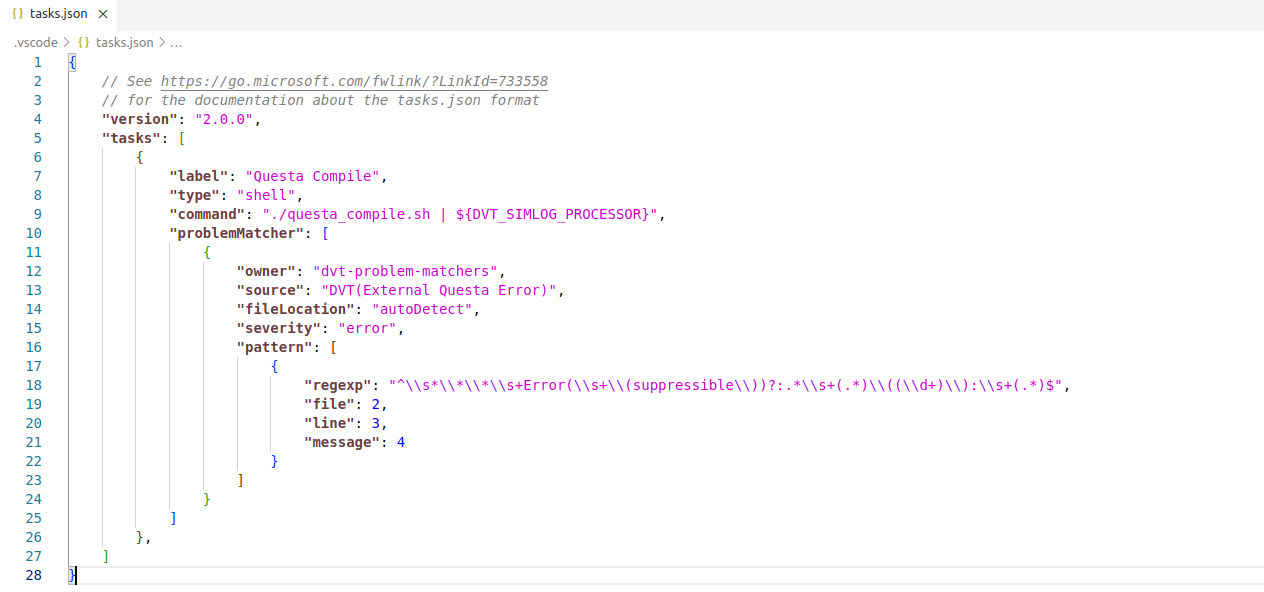
For more information, see the Defining a problem matcher chapter in the official VS Code documentation.